

Google Keyword Planner for Keyword research is a commonly used term by people in SEO. If you happen to be a marketing student or an aspiring marketer, then it is likely that you may have encountered the above-mentioned term at one point in time. Keyword research builds upon the already advanced SEO methods and works together as a team to help make life easier for both an Internet user and a consumer. However, before learning about how to access and use the Google Keyword Planner, it is important to first learn what keyword research is all about.
What is Keyword Research?
Keyword Research is a technique used by people to conduct research on all the popular keywords or phrases that are used by people using different search engines, such as Google. This is basically carried out for achieving top rankings on search engine results pages. Keyword research is an evolving process where dependency on keyword density is slowly getting outdated because of more advanced search engine algorithms and thus, people in this industry are now moving away from keyword density to content relevance. Nonetheless, keyword research remains one of the most crucial techniques in digital marketing. In relation to keywords, there are two major types and it is necessary to know them before conducting keyword research for better SEO results:
1. Short Tail Keywords: As the name suggests, short tail keywords are “short” and range between one and three words. Short tail keywords are very competitive because of the high volume of search. Since they are shorter, it’s difficult to match the search intent of the user.
2. Long Tail Keywords: Long Tail keywords are more than three words and have a low volume of search and therefore are less competitive than the short tail. Since they are longer and more specific its easier to match them with the search intent.
For example, for this particular write-up, short tail keywords will be “keyword research”, “Google Keyword Planner”, “Google Adwords” etc. and Long tail keywords will be “how to use Google Keyword Planner”, “how to access Google Keyword Planner” etc.
| Basis | Short Tail Keywords | Long Tail Keywords |
| Range | 1-3 words | More than 3 |
| Search intent | Difficult to match | Easier to match |
| Competitive | High | Low |
| Volume of search | High | Low |
There is a wide variety of keyword research tools available for free, such as Google AdWords (Google keyword planner), Google Analytics, Google Trends, Moz Keyword Explorer, SEMrush, WordStream, etc. We will discuss in detail how to use Google ads, keyword planner? Also, Google Adwords can be accessed without paying anything ie You can use Google keyword planner for free! Just follow these steps.
How to use the free Google Keyword Planner for Keyword Research
Step 1: Create a Google Ads Account
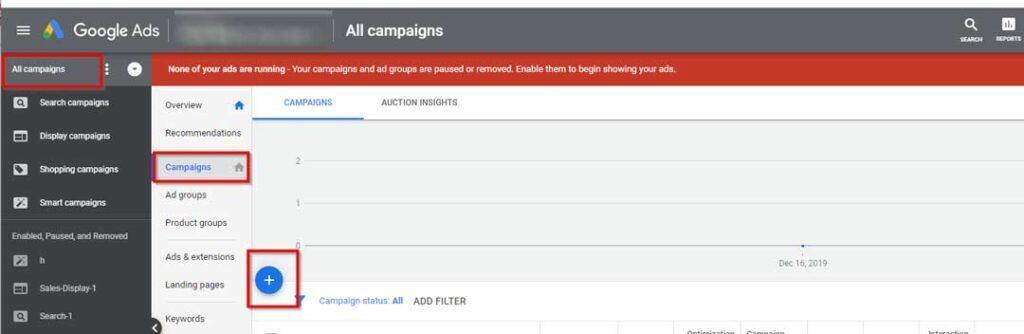
Step 2: Click on “ Switch to Expert Mode “ in Keyword Planner
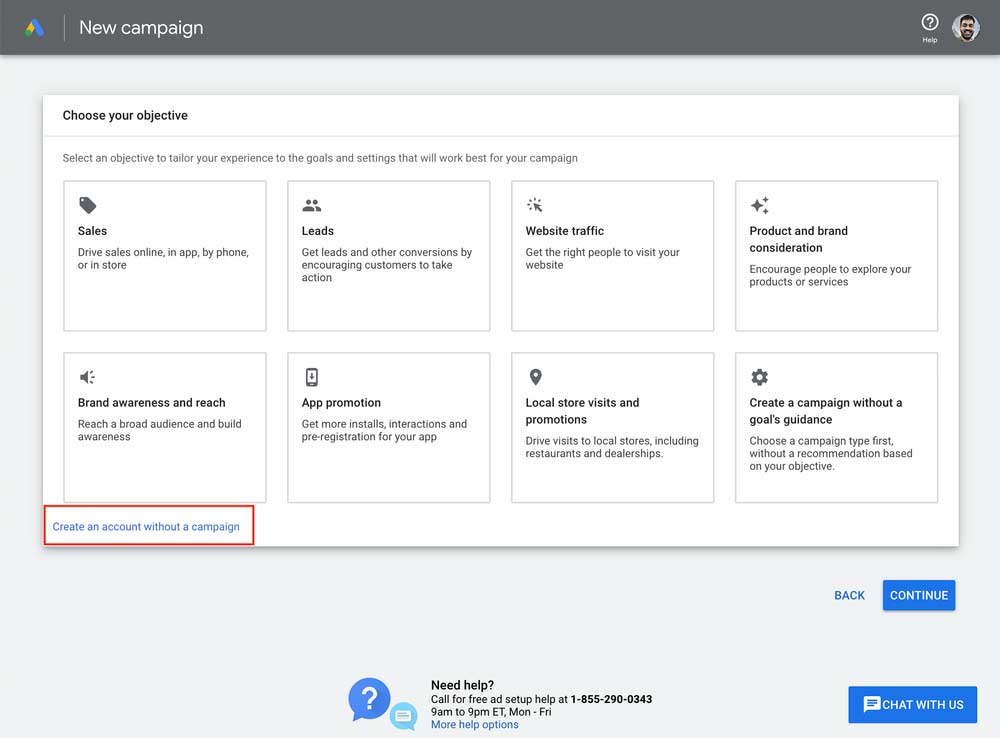
Step 3: Click “Create an account without campaign” on the next page
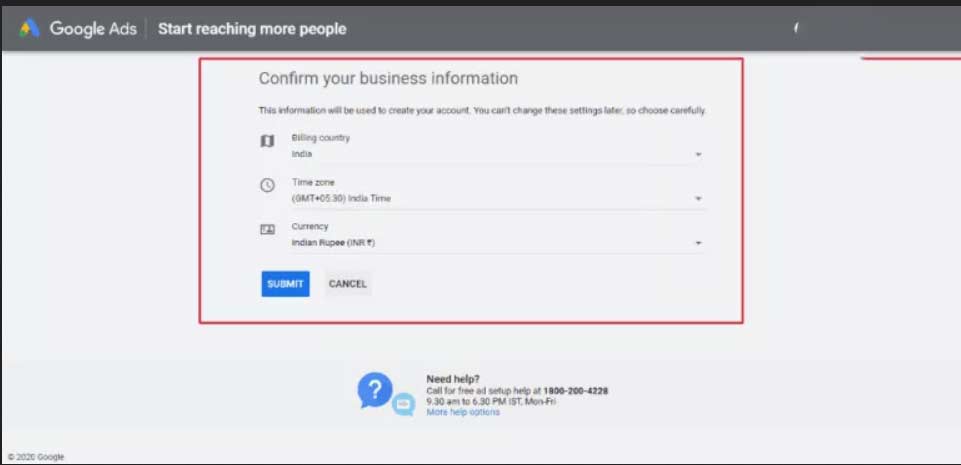
Step 4: Click on “Submit” on the next page
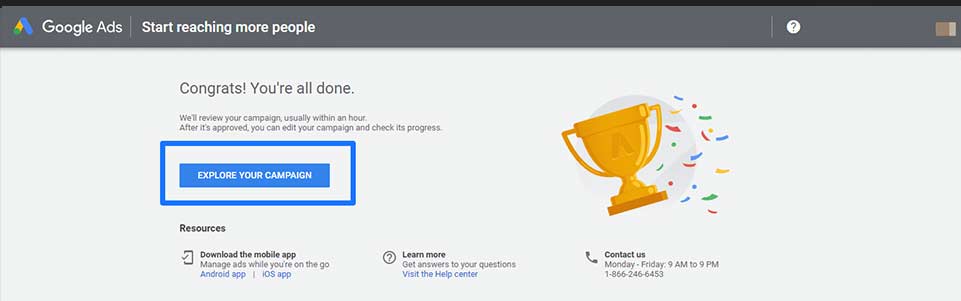
Step 5: Click on “Explore your Campaign” on the next page
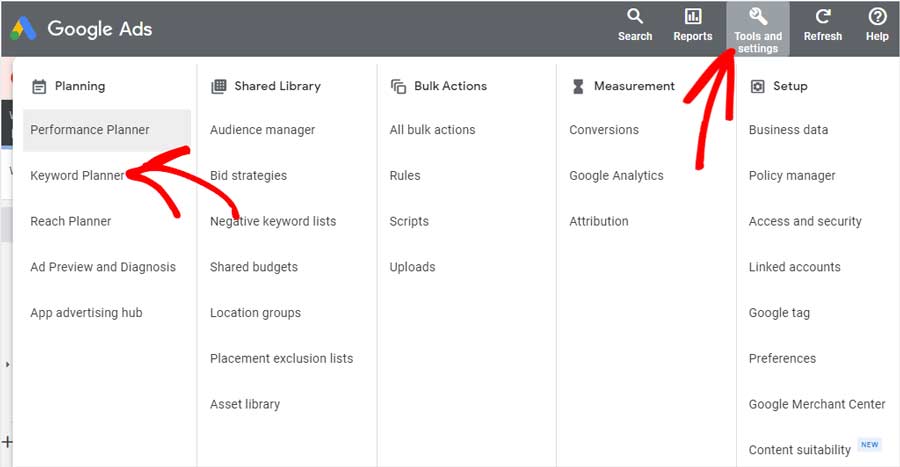
Step 6: Click on “Tools and Settings” on the next page, then click on “Keyword Planner”
With this last step, you have access to Google Keyword Planner for free and without creating an ad. Now, let’s see how to use the keyword planner for your keyword research.
How to use Google Adwords Keyword Planner
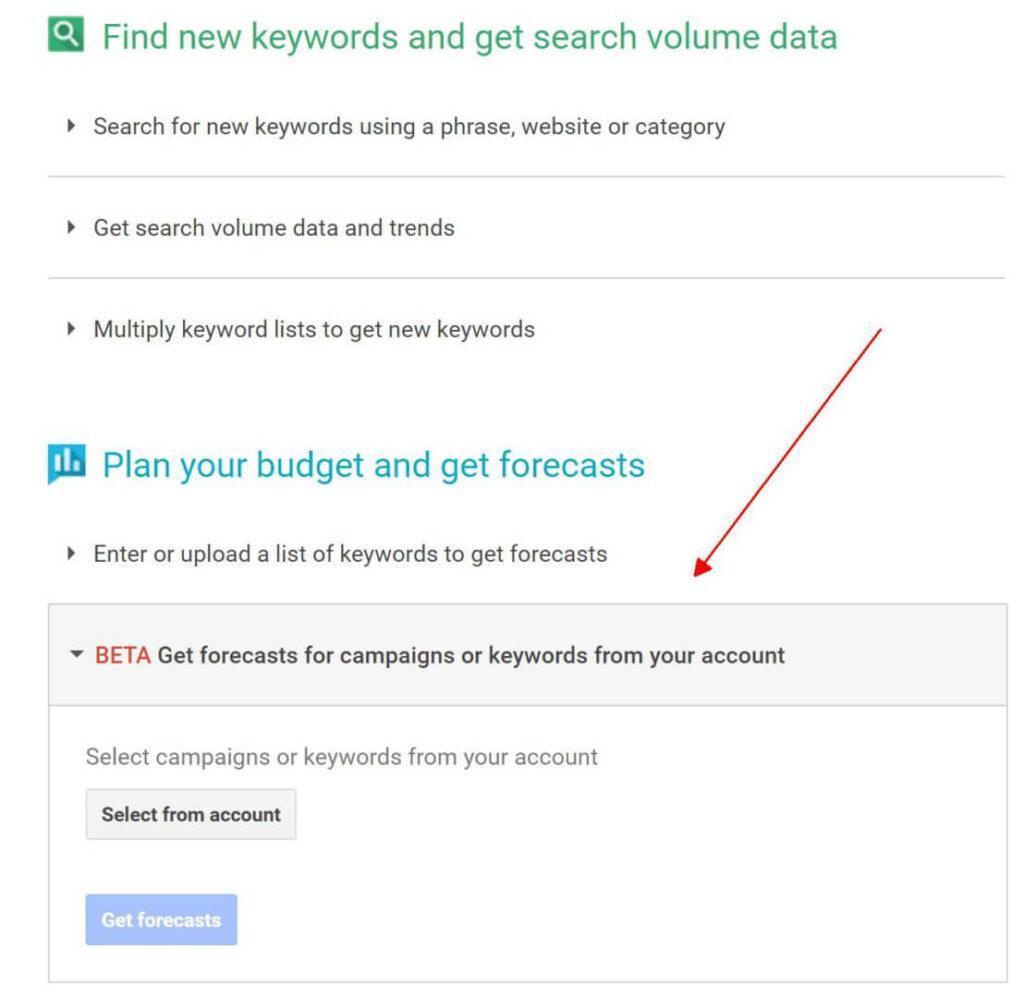
First, let’s discuss the basics of Google Keyword Planner. When you open the “Keyword Planner” in the “Planning” section you will see two options. First, “Discover New Keywords” and Second, “Get Search Volume and Forecasts”. We will discuss both of these options.
Discover New Keywords:
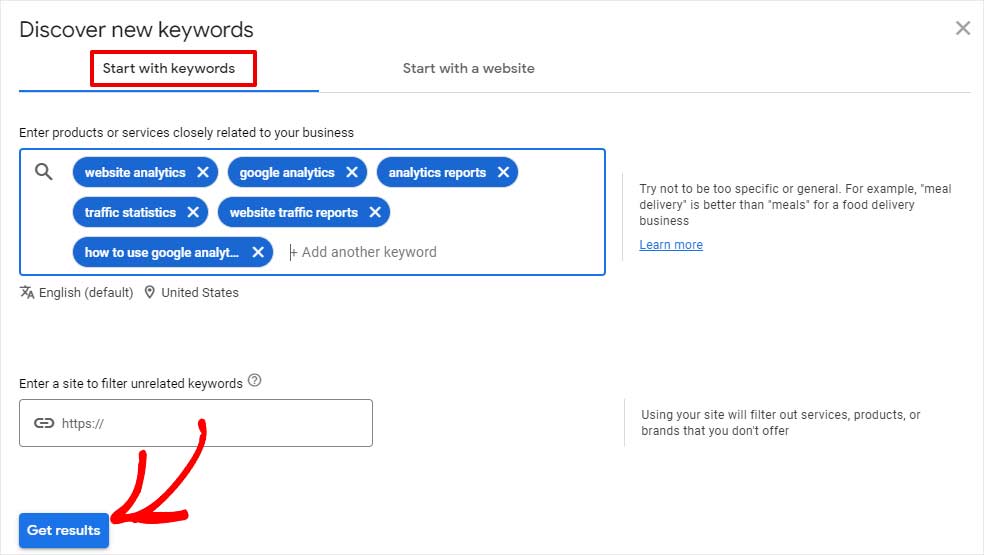
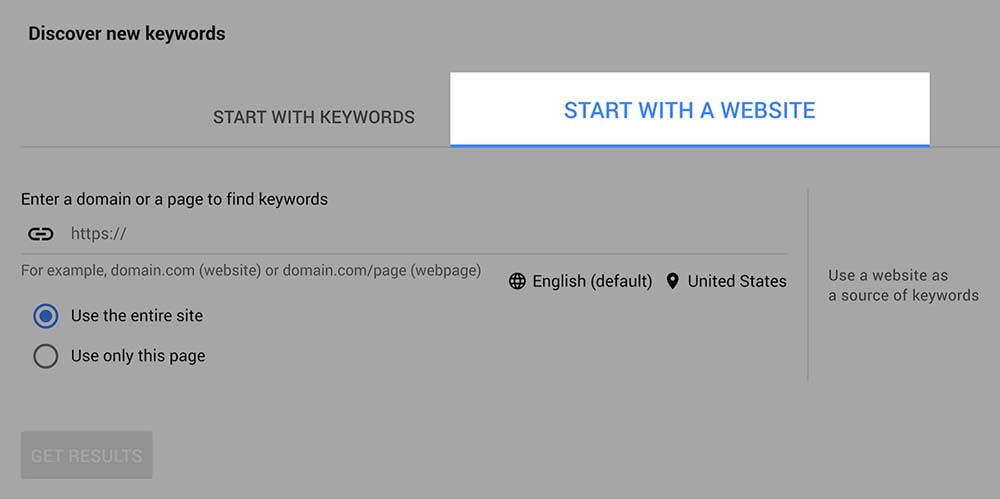
When you open Discover new keywords, you will have two options either to “Start with Keywords” or “Start with Website.”
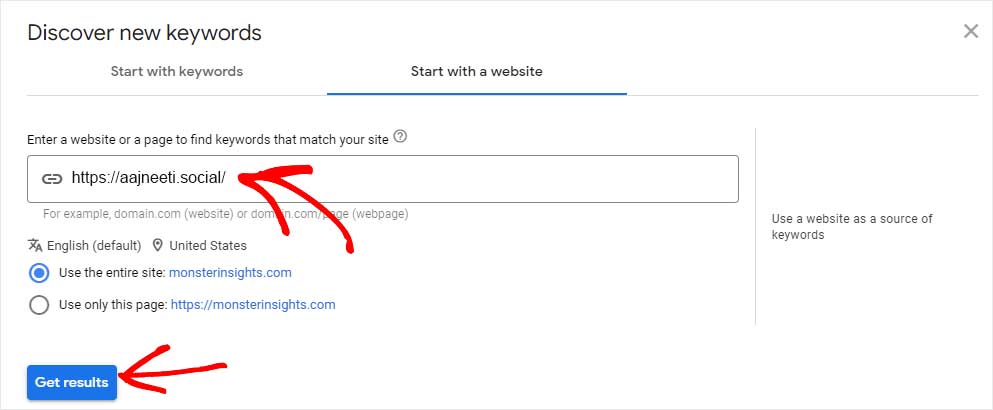
Start with your website:
When you open “Start with website” enter your site’s URL and you have two options “use entire site” or “use this page only”.
Get Search Volume and Forecasts:
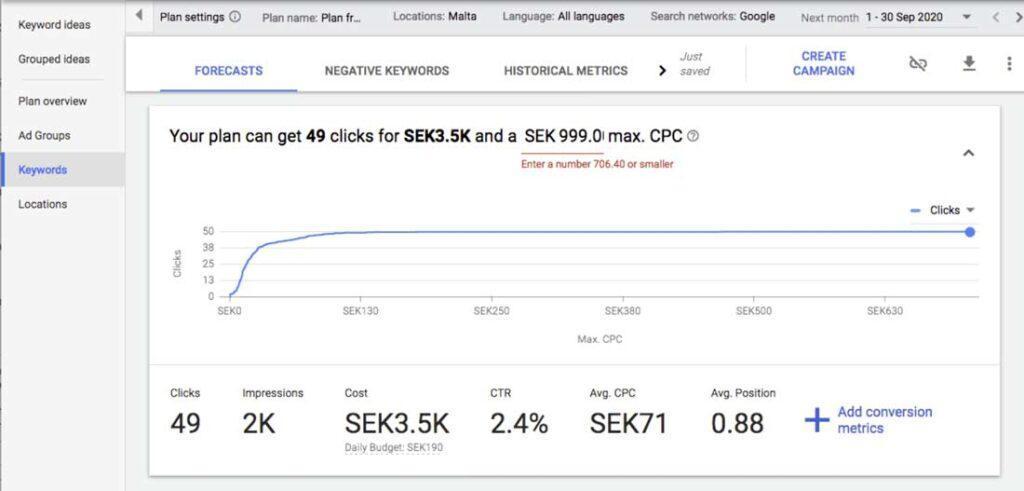
If you already have a list of keywords you wish to know the metrics for then paste those keywords and get “forecasts”.
CPC:
CPC stands for cost per click advertising. Here the advertiser pays when a click is made on an ad.
CTR:
Click-through rate is the ratio of users who click on a specific link to the total number of users who view a page, email, or advertisement. clicks ÷ impressions = CTR
Clicks:
When someone clicks your ad, like on the blue headline of a text ad, Google Ads counts that as a click.
Impressions:
An impression is counted each time your ad is shown on a search result page or other sites on the Google Network. Each time your ad appears on Google or the Google Network, it’s counted as one impression.
How to Get the Exact Search Volume in Keyword Planner for Keyword Research?
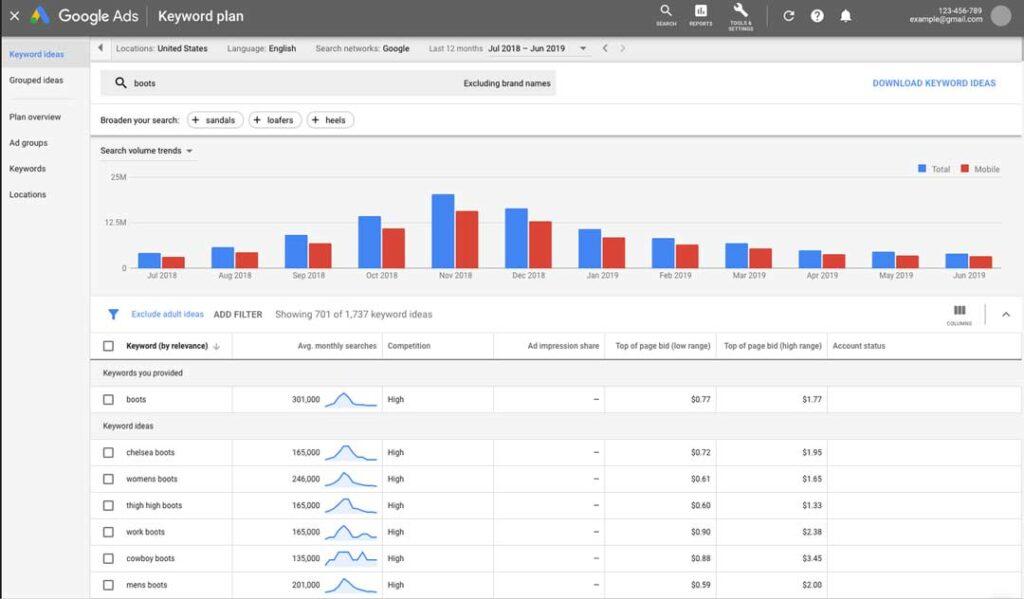
Google keyword planner doesn’t show you the exact search volume rather it gives you a range of volume(Like 10k-100k). Fortunately, there is a solution to the problem.
Pros and Cons of Google Adwords Keyword Planner
Pros
- Search Volume for Hyper-local Target Audience: Now, with this new feature, you can target the audience of a specific geographic location or a city and check the keyword volume for specific geographic locations. Previously, it was done in a local and global manner only.
- Ideal Tool for PPC Marketing Campaigns: It is a PPC(Pay-per-click) integrated tool. The “Ad Groups” option helps in planning for your PPC campaigns. It can be regarded as an effective tool to know which keywords have similarities.
- Keywords Filtered Based on Search Volume Criteria: You can filter out keywords with below 100 searches per month.
- No Subscription Cost Involved: As there are other services, such as Google Apps for Business, which come at some price, and many other tools that need subscription payments, but Google Adwords does not require anything except login credentials.
Cons
- No Broad or Phrase Match: Exact match is now the only data that is displayed. Although the exact match was usually the most accurate choice, the freedom to choose a broad phrase is now more difficult. However, broad phrases still exist when AdWord users choose how keywords are added to campaigns.
- No Searching for Related Terms: The option to see related terms was removed when the recent changes were made.
- No indication of trends: Google Trends is a better option for those trying to understand search trends. Google averages the last 12 months of search volume to deliver the “average monthly searches” data. You can, however, mouse over the graph icon to the left of these data to get a snapshot of the last 12 months. If you’d like to optimize your digital marketing strategy for keywords that are trending upwards, then it’s best to use Google Trends.
Tips for Better Keyword Research in Search Engine Optimization(SEO)
At its core, Keyword Research is about bridging the gap between what the user wants and how to provide the same to them. In order to achieve that, marketers have to keep in consideration the search intent of the users. Marketers and SEO professionals must strive to provide users with the most relevant results to the query, which is where keyword research comes in. Let’s look at an example. If you want to purchase a camera that best fits your requirements, then SEO professionals must look beyond the explicit search intent. What are the types of cameras? What is a DSLR and a mirrorless camera? Which camera is better for photography and which is better for videography? What are 4k quality and fps? What is the best camera available in my price range? Taking such queries into cognizance, you can aim towards better keyword planning as now you have a better understanding of your target audience and therefore it’s a smart strategy to aim beyond just “Top 10 DSLR Mirrorless Camera in 2026”.
The next step is to not only find your target audience but also to understand the personality so that the marketer puts more effort into optimizing the website using appropriate keywords. It should be kept in mind that every product/service/website attracts certain users having similar characteristics and it cannot appeal to all kinds of users. Therefore, it’s necessary to identify a particular kind of audience that would attract the maximum traffic. A good starting point is to come up with the primary keyword.
The second thing that needs to be avoided by marketers in Keyword Stuffing. Keyword stuffing means the overuse of the keyword even if it’s not necessary. The general rule is to keep your keywords under 1-1.5% of the article content. Keyword stuffing would hamper the quality of your article and ranking. There are chances that your article would get flagged by the bot as spam due to excessive use of the keyword. It is recommended to use the LSI keyword.
Conclusion
Keyword research and keyword planning are unequivocally crucial not only for businesses and advertisements but also for blog posts and all sorts of websites and have become a key component of Search Engine Optimization. Google Ads Keyword Planner has emerged to be one of the most popular keyword planners available which has worked in the bona fide interests of many new and small websites and businesses but it’s not without any limitations. Keyword planning is based on complex, intricate, and dynamic algorithms and as someone who just discovered this, it can be hard to keep up with. Therefore, many businesses, companies, and websites outsource this task to SEO Professionals, Marketers, and Advertising agencies. Even if you have just started out with a new website or a business, chances are that in the near future you will need to employ keyword planning and research into your website.